

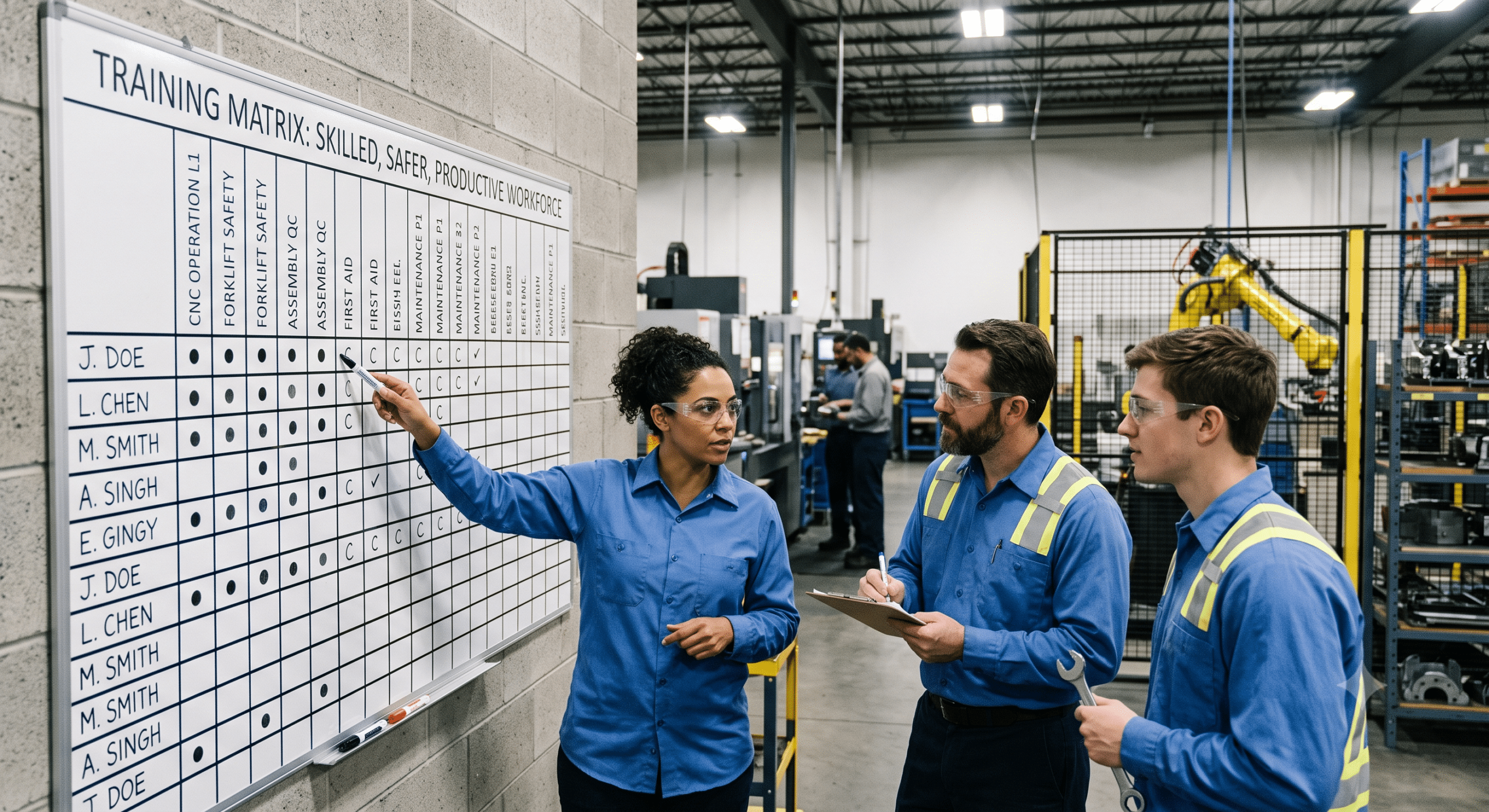
To begin with, implementing a highly effective manufacturing training matrix is critical for operational success. Indeed, walk into almost any manufacturing plant and you’ll find experienced workers who know exactly how to run machines, inspect products, solve production issues, and maintain quality. However, the challenge isn’t finding talented people—rather, it’s making sure everyone has the right skills at the right time.
Consequently, this is where a structured learning system becomes one of the most valuable tools in any factory.
The Strategic Value of a Learning System
As a matter of fact, as an Instructional Systems Designer (ISD) and Learning Architect, I’ve learned that effective workforce training isn’t about creating more courses. Instead, it’s about designing a learning system that connects employee skills with business goals. Furthermore, a training matrix provides that connection by showing managers exactly who is trained, who needs additional instruction, and where skill gaps exist before they become production problems.
Ultimately, whether your organization produces automotive parts, electronics, food products, pharmaceuticals, or industrial equipment, a well-designed training matrix creates consistency across the workforce. Moreover, it supports safety, improves quality, and helps organizations prepare for future growth instead of constantly reacting to staffing shortages. Therefore, in this guide, you’ll learn how to build an effective manufacturing training matrix, avoid common mistakes, and apply instructional design principles that create lasting results.
What Is a Training Matrix in Manufacturing?
Essentially, a training matrix manufacturing system is a visual tool that maps employees against required skills, certifications, equipment qualifications, and mandatory training. For instance, think of it as a living roadmap.
Mapping Competencies and Status
Specifically, on one side are employees or job roles. Meanwhile, across the top are required competencies, including:
-
Machine operation
-
Safety procedures
-
Standard Operating Procedures (SOPs)
-
Quality inspections
-
Equipment maintenance
-
Regulatory compliance
-
Cross-training requirements
Additionally, each cell shows whether an employee has:
-
Not started
-
In training
-
Competent
-
Certified
-
Due for refresher training
As a result, instead of searching through paper files or multiple spreadsheets, supervisors can quickly determine who is qualified for specific production tasks. Furthermore, this visibility improves planning while reducing operational risk. Finally, modern digital training matrices also integrate with Learning Management Systems (LMS), HR software, and production systems, making updates much easier than manual tracking.
Why Manufacturing Companies Need a Training Matrix
Undeniably, manufacturing environments constantly change. First, new equipment arrives. Second, processes improve. Third, products evolve. Finally, experienced employees retire.
Consequently, without a structured learning system, organizations lose valuable knowledge every year. Therefore, a training matrix solves this challenge by creating consistency across the workforce. Specifically, benefits include:
-
Better production quality
-
Faster onboarding
-
Reduced safety incidents
-
Easier compliance audits
-
Stronger workforce flexibility
-
Lower downtime
-
Better succession planning
In conclusion, from a learning architecture perspective, a training matrix transforms training from a one-time event into a continuous capability management process.
The Learning Architect’s Perspective
Interestingly, many organizations confuse training records with learning systems. However, they’re very different. For instance, a spreadsheet showing completed courses doesn’t guarantee employees can perform the work.
Conversely, Instructional Systems Design focuses on actual performance. Accordingly, before adding any course to the training matrix, you must ask:
-
What business problem are we solving?
-
What must employees do differently?
-
How will we measure competence?
-
What evidence proves mastery?
Ultimately, these questions ensure every training activity contributes directly to operational performance rather than simply checking compliance boxes.
The 7 Core Components of a Manufacturing Training Matrix
Generally, a successful training matrix manufacturing framework includes more than just employee names and completed courses. Below, here are the 7 essential components every organization should include.
1. Employee Information
Naturally, you must include:
-
Employee name
-
Department
-
Job title
-
Shift
-
Supervisor
-
Hire date
Consequently, accurate employee information allows managers to filter reports by department, production line, or shift.
2. Required Competencies
Next, list every required capability, such as:
-
Forklift operation
-
CNC programming
-
Welding
-
Assembly procedures
-
Packaging
-
Quality inspection
-
Preventive maintenance
Importantly, each competency should connect directly to actual job responsibilities.
3. Training Status
Furthermore, use standardized indicators. For example:
-
Not Started
-
Scheduled
-
In Progress
-
Completed
-
Certified
-
Expired
Above all, avoid creating complicated rating systems that supervisors won’t consistently update.
4. Certification Dates
In addition, you need to track:
-
Initial completion
-
Assessment date
-
Certification expiration
-
Refresher requirements
Significantly, this information becomes especially valuable during OSHA or ISO audits.
5. Skill Levels
Similarly, many organizations use competency ratings such as:
-
Level 1 – Awareness
-
Level 2 – Assisted Performance
-
Level 3 – Independent Operation
-
Level 4 – Trainer
As a result, this approach supports workforce planning while encouraging career development.
6. Cross-Training Opportunities
Moreover, cross-training improves production flexibility. Rather than assigning employees to only one machine, managers can identify workers capable of supporting multiple production areas. Consequently, benefits include:
-
Reduced bottlenecks
-
Easier vacation coverage
-
Better labor utilization
-
Improved resilience during staffing shortages
7. Review Schedule
Finally, a training matrix should never become a forgotten spreadsheet. Therefore, review it:
-
Monthly
-
Quarterly
-
After new equipment installation
-
Following process changes
-
After safety incidents
-
During annual competency reviews
Ultimately, regular reviews keep learning aligned with operational needs.
Building a Training Matrix Using the ADDIE Model
Typically, Instructional Systems Designers use the ADDIE model because it creates repeatable learning systems. Now, let’s see how it applies to manufacturing.
Analysis
Initially, identify:
-
Required job tasks
-
Performance gaps
-
Regulatory requirements
-
Production goals
-
Safety risks
Furthermore, interview supervisors and observe employees performing actual work. Most importantly, avoid relying solely on existing documentation.
Design
Subsequently, design learning paths for each role. For example, an Assembly Operator path might look like this:
-
Safety Orientation
-
Equipment Basics
-
Machine Setup
-
Quality Inspection
-
Independent Operation
-
Annual Recertification
Consequently, this creates logical learning progression instead of random course assignments.
Development
Next, create learning materials including:
-
SOP guides
-
Visual work instructions
-
Video demonstrations
-
Job aids
-
Quick reference cards
-
Practical assessments
Indeed, because adult learners retain more knowledge when training directly relates to daily work, these materials are vital.
Implementation
Afterward, deliver training using multiple formats:
-
Classroom sessions
-
On-the-job coaching
-
Digital learning
-
Simulation
-
Peer mentoring
-
Supervisor observation
Unquestionably, blended learning typically produces stronger results than relying on a single delivery method.
Evaluation
Lastly, measure outcomes such as:
-
Training completion
-
Competency assessments
-
Production quality
-
Safety performance
-
Downtime reduction
-
Employee confidence
-
Supervisor observations
In conclusion, learning should always connect back to measurable business performance.
Step-by-Step Guide to Creating a Training Matrix Manufacturing System
Admittedly, building a training matrix manufacturing program does not require expensive software on day one. Instead, the most successful organizations begin with a clear process and improve it over time.
Step 1: Identify Every Job Role
To start, list every position involved in production. Specifically, examples include:
-
Production Operator
-
Machine Operator
-
Assembly Technician
-
Quality Inspector
-
Maintenance Technician
-
Warehouse Associate
-
Shipping Coordinator
-
Production Supervisor
Since each role has different training requirements, avoid using one generic training plan for everyone.
Step 2: Define Required Competencies
Following that, for every role, identify the knowledge and skills employees must demonstrate before working independently. For instance:
| Job Role | Required Competencies |
| Machine Operator | Machine setup, lockout/tagout, preventive maintenance, product changeover |
| Quality Inspector | Inspection methods, defect recognition, measurement tools |
| Maintenance Technician | Equipment troubleshooting, electrical safety, preventive maintenance |
| Warehouse Associate | Forklift certification, inventory procedures, shipping documentation |
Crucially, competencies should be observable and measurable rather than vague descriptions like “good communication.”
Step 3: Group Training Categories
Rather than maintaining hundreds of unrelated training items, organize them into logical categories. For example, typical manufacturing categories include:
-
Safety Training
-
Quality Systems
-
Equipment Operation
-
Standard Operating Procedures (SOPs)
-
Environmental Compliance
-
Maintenance
-
Leadership
-
Continuous Improvement
-
Lean Manufacturing
-
Emergency Response
Consequently, this structure keeps the matrix organized as the company grows.
Step 4: Establish Competency Levels
Because every employee progresses differently, instead of marking training simply as complete, use competency levels. Specifically:
| Level | Meaning |
| Level 1 | Awareness |
| Level 2 | Performs with supervision |
| Level 3 | Works independently |
| Level 4 | Coaches others |
| Level 5 | Subject Matter Expert |
As a result, this approach gives supervisors better visibility into workforce capability.
Step 5: Validate Skills on the Job
Importantly, completing a course should not automatically mean someone is qualified. Thus, an effective training matrix manufacturing system requires practical validation. Specifically, methods include:
-
Supervisor observation
-
Practical demonstrations
-
Skill checklists
-
Written assessments
-
Production quality reviews
-
Safety observations
Ultimately, competence is demonstrated through performance—not attendance.
Step 6: Review Regularly
Because manufacturing changes constantly, review the matrix whenever:
-
New equipment is installed
-
Products change
-
SOPs are updated
-
New regulations are introduced
-
Employees transfer departments
-
Annual competency reviews occur
In summary, keeping the matrix current makes it a trusted operational tool rather than an outdated document.
Common Mistakes Organizations Make
In retrospect, after supporting manufacturing learning programs for years, I’ve noticed several recurring problems. Consequently, avoiding these mistakes will save time and improve training outcomes.
Mistake 1: Treating Training as a One-Time Event
Unfortunately, learning fades over time. Therefore, employees need:
-
Practice
-
Coaching
-
Feedback
-
Refresher training
In short, competency should be maintained, not assumed.
Mistake 2: Tracking Attendance Instead of Competence
Conversely, attendance records only show that someone was present. In reality, they do not prove employees can:
-
Operate equipment safely
-
Follow SOPs
-
Solve production issues
-
Meet quality standards
Therefore, always measure performance.
Mistake 3: Ignoring Cross-Training
Frequently, many factories depend heavily on a few experienced operators. Consequently, when those employees are absent:
-
Production slows
-
Overtime increases
-
Quality suffers
Thus, cross-training reduces operational risk while improving workforce flexibility.
Mistake 4: Creating Overly Complex Matrices
Similarly, some organizations track hundreds of unnecessary data fields. As a result, complex systems often fail because supervisors stop updating them. Therefore, keep the matrix:
-
Easy to understand
-
Easy to update
-
Focused on critical competencies
Ultimately, simplicity encourages consistent use.
Mistake 5: Not Aligning Training with Business Goals
Above all, training should support measurable business outcomes. For example, goals include:
-
Reducing defects
-
Improving productivity
-
Increasing safety
-
Shortening onboarding time
-
Supporting new product launches
Consequently, if training does not improve performance, it should be redesigned.
Spreadsheet vs. Digital Training Matrix
Initially, many organizations begin with spreadsheets before moving to specialized learning platforms. However, each option has advantages.
| Feature | Spreadsheet | Digital System (LMS) |
| Cost | Low cost | Higher initial investment |
| Setup | Easy to create | Automated updates |
| Reminders | Manual reminders | Automatic notifications |
| Reporting | Manual reporting | Real-time dashboards |
| Records | Difficult version control | Centralized records |
| Growth | Limited scalability | Supports large workforces |
On one hand, for small manufacturers, spreadsheets may be enough. On the other hand, growing organizations often benefit from digital systems that integrate with HR and Learning Management Systems (LMS). Ultimately, modern LMS platforms can automate assignments, reminders, reporting, and certification tracking, reducing administrative work while improving accuracy.
Supporting ISO Standards and Regulatory Compliance
Undoubtedly, many manufacturers operate under quality management systems requiring documented competence. Accordingly, a well-maintained training matrix supports compliance by demonstrating:
-
Required training assignments
-
Employee qualifications
-
Competency evaluations
-
Refresher schedules
-
Certification history
-
Supervisor approvals
Consequently, instead of searching through filing cabinets during an audit, organizations can quickly provide evidence of workforce competence. Furthermore, training matrices also support:
-
OSHA safety programs
-
GMP environments
-
Food safety systems
-
Medical device manufacturing
-
Aerospace quality requirements
Ultimately, documentation is not the goal—demonstrating capable performance is.
Key Performance Indicators (KPIs) for Training Effectiveness
Naturally, learning leaders should measure business impact, not just completion rates. Specifically, useful KPIs include:
-
Training Completion Rate: First, this tracks the percentage of required courses completed on time.
-
Competency Achievement Rate: Next, this measures how many employees reach independent performance.
-
Time to Competency: Also, this shows how quickly new employees become fully productive. Indeed, reducing onboarding time can significantly lower labor costs.
-
Cross-Training Coverage: Additionally, this measures workforce flexibility. For example, you can track the percentage of employees qualified on multiple machines, backup coverage for critical positions, and department versatility.
-
Safety Performance: Likewise, you should monitor changes in recordable incidents, near misses, equipment damage, and safety observations. Therefore, effective learning programs often contribute to stronger safety outcomes.
-
Quality Metrics: Furthermore, compare training improvements with scrap rate, rework, customer complaints, first-pass yield, and defect rates. Similarly, if quality improves after targeted training, instructional design is adding measurable value.
-
Employee Retention: Finally, employees who receive structured development opportunities are often more engaged and more likely to stay with the organization. Moreover, a visible learning path also supports internal career growth.
The Role of Supervisors in Training Success
Ultimately, a training matrix is only as effective as the people who use it. Specifically, supervisors play a critical role by:
-
Identifying skill gaps
-
Coaching employees
-
Verifying competency
-
Updating training records
-
Reinforcing SOPs
-
Encouraging continuous learning
In essence, instructional designers create the learning system, but supervisors ensure it becomes part of daily operations.
Real-World Example
For instance, imagine a manufacturing company with 150 production employees producing industrial components.
Previously, before implementing a structured training matrix:
-
New hires required several months to reach full productivity.
-
Different shifts followed procedures inconsistently.
-
Supervisors struggled to identify qualified backup operators.
-
Audit preparation involved searching through paper records.
Conversely, after implementing a competency-based training matrix manufacturing system:
-
Every role had defined learning paths.
-
Skill verification became standardized.
-
Managers could instantly identify certified employees.
-
Cross-training increased operational flexibility.
-
Audit preparation became much faster because records were centralized.
-
Training priorities were based on production risks rather than assumptions.
Ultimately, the biggest improvement wasn’t simply better documentation—rather, it was greater confidence that employees had the skills needed to perform safely and consistently.
The Future of Training Matrix Manufacturing
Indeed, manufacturing continues to evolve with automation, robotics, Industrial Internet of Things (IIoT), artificial intelligence (AI), and smart factories. Consequently, as production becomes more connected, workforce training must evolve as well.
Moreover, a modern training matrix manufacturing system is no longer just a record of completed courses. Instead, it is becoming a workforce intelligence tool that helps leaders answer questions like:
-
Which production lines have the strongest skill coverage?
-
Where are the biggest competency gaps?
-
Which employees are ready for promotion?
-
Which certifications are about to expire?
-
Which critical machines rely on only one qualified operator?
As a result, these insights help organizations make better staffing decisions while reducing operational risk.
How AI Is Changing Manufacturing Learning
Currently, artificial intelligence is transforming the way organizations design and deliver training. However, AI should support instructional design—not replace it. For instance, as an Instructional Systems Designer (ISD), I see AI as a productivity tool that can assist with:
-
Recommending personalized learning paths
-
Identifying skill gaps from workforce data
-
Creating first drafts of training materials
-
Translating work instructions into multiple languages
-
Scheduling refresher training automatically
-
Predicting future workforce capability needs
Nevertheless, human experts are still responsible for validating learning objectives, ensuring accuracy, and confirming that employees can safely perform real-world tasks. Ultimately, the most successful manufacturers combine technology with experienced supervisors, trainers, and instructional designers.
Creating a Culture of Continuous Learning
Fundamentally, a training matrix only creates value when learning becomes part of the organization’s culture. Therefore, leaders should encourage employees to:
-
Learn new equipment
-
Earn additional certifications
-
Share knowledge with teammates
-
Participate in improvement projects
-
Mentor new employees
-
Suggest process improvements
Furthermore, recognition matters. Consequently, employees who expand their skills should see opportunities for advancement, additional responsibilities, or leadership development. In conclusion, when workers understand that learning supports career growth—not just compliance—they become active participants in workforce development.
Final Thoughts
In summary, a training matrix manufacturing system is much more than an administrative spreadsheet. Specifically, when designed using sound Instructional Systems Design (ISD) principles, it becomes a strategic workforce development framework that supports:
-
Safer operations
-
Better quality
-
Faster onboarding
-
Greater cross-training
-
Stronger regulatory compliance
-
Improved workforce planning
-
Continuous improvement
Ultimately, the most effective matrices are simple enough for supervisors to use every day, yet detailed enough to support audits, succession planning, and operational decision-making.
Above all, remember that the goal is not to document training—it is to develop competent employees who consistently perform work safely and effectively. Therefore, as manufacturing technologies continue to evolve, organizations that invest in structured learning systems today will be better prepared for tomorrow’s challenges.
Frequently Asked Questions (FAQ)
What is a training matrix in manufacturing?
Basically, a training matrix is a visual tool that tracks employee skills, required training, certifications, competency levels, and refresher schedules. Moreover, it helps manufacturers ensure that workers are qualified for the tasks they perform.
Why is a training matrix important?
Primarily, it helps organizations:
-
Improve workplace safety
-
Reduce production errors
-
Meet compliance requirements
-
Identify skill gaps
-
Support workforce planning
-
Increase operational flexibility
How often should a training matrix be updated?
Generally, most manufacturers should review and update the matrix:
-
Monthly
-
After hiring new employees
-
Following equipment changes
-
When SOPs are revised
-
After certification renewals
-
During annual performance reviews
Therefore, frequent updates keep the information accurate and useful.
What should be included in a manufacturing training matrix?
Typically, a comprehensive matrix includes:
-
Employee names
-
Job roles
-
Required competencies
-
Training status
-
Certification dates
-
Competency levels
-
Refresher training schedules
-
Supervisor approval
Is Excel enough for a training matrix?
Initially, Excel works well for small manufacturers with limited employees. However, as organizations grow, digital Learning Management Systems (LMS) provide advantages such as:
-
Automated reminders
-
Real-time reporting
-
Certification tracking
-
Audit documentation
-
Integration with HR systems
-
Improved version control
How does a training matrix support ISO compliance?
Undoubtedly, many quality management systems require organizations to demonstrate employee competence. Accordingly, a training matrix provides documented evidence of:
-
Required training
-
Completed training
-
Competency verification
-
Certification status
-
Refresher training
Consequently, this information helps simplify internal and external audits.
How is a training matrix different from a skills matrix?
Although the terms are often used interchangeably, they serve slightly different purposes. Specifically, a training matrix focuses on required learning activities, certification status, and compliance. Conversely, a skills matrix emphasizes actual proficiency and the current ability of employees to perform specific tasks. Nevertheless, many manufacturers combine both into a single competency management system.
Key Takeaways
To summarize, a successful training matrix manufacturing program should:
-
Align learning with business objectives.
-
Focus on measurable job performance rather than course completion.
-
Use competency verification to confirm employee readiness.
-
Support cross-training to improve production flexibility.
-
Include regular reviews and refresher training.
-
Leverage digital tools when workforce complexity increases.
-
Encourage a culture of continuous learning and improvement.
Ultimately, when instructional design principles are combined with operational excellence, the training matrix becomes one of the most valuable workforce management tools in a manufacturing organization.
Here is a clean, professional rewrite of your references, using hyperlinked titles to make the list more readable and visually appealing for a digital format (like a blog post, article, or PDF).
References
The following high-authority resources provide additional guidance on training matrices, instructional design, and manufacturing workforce development:
-
Cloud Assess – Manufacturing Training Matrix: Benefits, Guide & Template
-
Coggno – What Is a Training Matrix? Mapping Required Training by Role and Site
-
MANTEC – The Training Matrix: How Manufacturers Are Building Skills They Can Actually See
-
ProProfs Training Maker – Employee Training Matrix: What It Is, Benefits, and How to Create One
-
Sharpen Manufacturing – The Skills Matrix Every Manufacturing Plant Needs